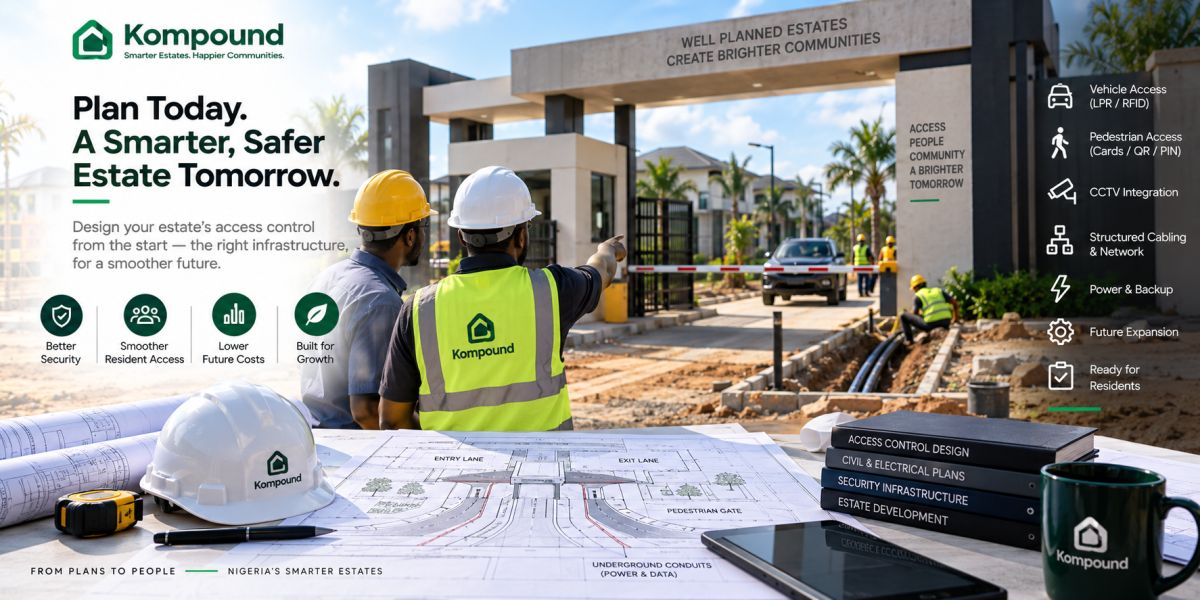
# Access Control for New Estate Developments: Plan It Before Construction Ends
If your estate is still on drawings, this is the cheapest time to get access control right.
Before the roads are finished.
Before the gatehouse is tiled.
Before interlocking stones cover your cable routes.
Before someone discovers that the boom barrier needs power on the opposite side of the entrance.
Before your security contractor starts running exposed cables across finished walls.
A new estate should not treat access control as equipment you buy shortly before residents move in.
You should design it as part of the estate infrastructure.
That means deciding early:
- Where vehicles enter and exit
- Where pedestrians enter
- Where security sits
- Where access controllers will be installed
- Where network cables will run
- Where power comes from
- What gets backup power
- Where barriers and readers will stand
- How visitors will be approved
- How residents will enter
- What happens when the internet goes down
- What you may want to add five years later
Getting those decisions right while the estate is still under development can save you from breaking finished roads and walls later.
Start with the gate process, not the equipment
Do not begin by choosing a boom barrier.
Do not begin with facial recognition.
Do not begin with RFID.
First decide how people should move through the estate.
For vehicles, ask:
- How will residents enter?
- How will visitors enter?
- How will deliveries enter?
- How will contractors enter?
- How will emergency vehicles enter?
- How will vehicles leave?
- Will entry and exit use separate lanes?
For pedestrians, ask:
- Is there a separate pedestrian gate?
- Will residents use cards, PINs, biometrics or mobile credentials?
- How will visitors be admitted?
- Can security override the system?
Once the process is clear, you can select hardware that supports it.
Decide how many lanes you actually need
A common mistake is designing a beautiful gatehouse without properly modelling traffic.
Think about the completed estate.
If you are developing 300 homes, your entrance may eventually handle hundreds of movements during morning and evening peaks.
Consider whether you need:
- One shared entry/exit lane
- Separate entry and exit lanes
- Resident lane
- Visitor lane
- Delivery holding area
- Lay-by for visitor verification
- Pedestrian entrance
The cheapest gate layout during construction can become the most expensive operational problem later.
A visitor waiting for verification should not necessarily block ten residents trying to get home.
Create space before you create automation
Automatic barriers and access readers need physical space.
Before finishing the gate area, mark the positions of:
- Boom barrier cabinets
- Barrier arm sweep
- Gate motors
- RFID readers
- QR terminals
- Intercoms
- Keypads
- Loop detectors
- CCTV poles
- Number-plate cameras
- Pedestrian readers
- Emergency release points
You also need enough space for technicians to service the equipment later.
Do not install a controller or motor in a location where it becomes inaccessible once landscaping is completed.
Plan your conduits before you finish the road
This is one of the most important things you can do.
Run empty conduits even for equipment you may not install immediately.
Your gate may eventually need cables for:
- Power
- Network
- Barrier controller
- Loop detector
- Intercom
- RFID reader
- QR terminal
- CCTV
- ANPR camera
- Pedestrian access
- Gate sensors
- Emergency button
It is far cheaper to install proper underground conduits during construction than to cut through your finished road two years later.
Where possible, provide spare conduits too.
Technology changes.
Your road should not need to.
Separate power and data properly
Do not throw every cable into one pipe simply because the trench is open.
Your electrical and security contractors should plan the routes properly for:
- Mains power
- Low-voltage power
- Network/data
- Control wiring
- Sensor wiring
The design should consider interference, maintenance access, cable rating and safe separation.
The exact implementation should be handled by qualified electrical and security professionals according to the equipment specifications and applicable installation requirements.
Structured cabling matters as much as the access-control device itself. Nigerian security installers increasingly design PoE and structured network runs as part of access-control and surveillance projects rather than depending on improvised Wi-Fi or exposed cabling.
Put pull boxes and inspection points where technicians can reach them
Long underground cable runs become difficult to repair when there is no practical access point.
Your design may need:
- Pull boxes
- Inspection chambers
- Junction boxes
- Accessible equipment cabinets
Do not hide critical connections permanently beneath finished concrete.
Future technicians should be able to inspect and replace cables without destroying your entrance.
Decide where your access controller will live
The controller is one of the most important parts of the system.
It receives information from readers and decides what should happen.
Your controller should be:
- Protected from rain
- Protected from unauthorised access
- Accessible for maintenance
- Close enough to connected equipment
- Properly powered
- Properly networked
Do not casually mount your main controller outside beside the reader where anyone can reach it.
Where possible, sensitive control equipment should sit on the secure side of the entrance.
Some modern access-control architectures place intelligence close to the controlled opening and can use Ethernet and Power over Ethernet, reducing the need for separate local power supplies in certain configurations.
Design the network before residents move in
Your gate should not depend on somebody installing a home router inside the guardhouse after commissioning.
Decide how the entrance connects to your wider estate network.
Depending on your development, that could involve:
- Fibre
- CAT6
- Managed switches
- PoE
- Point-to-point wireless links
- Secondary connectivity
For a large estate, consider fibre between major infrastructure points rather than trying to stretch copper runs beyond their practical limits.
The gate is operational infrastructure.
Treat its network accordingly.
Decide what needs to work offline
This should be specified during design, not after the first network failure.
Your gate may need to continue handling:
- Resident access
- Existing visitor approvals
- Exit
- Barrier operation
- Local access records
even when cloud connectivity is temporarily unavailable.
Local or hybrid access-control systems can be designed to continue controlling access and recording events during an internet outage, then synchronise when connectivity returns. Nigerian integrators already offer this architecture for estate access systems.
So ask your access-control provider early:
Which decisions happen locally, and which require the internet?
Plan backup power from the beginning
Your gate equipment may include:
- Barrier
- Gate motor
- Access controller
- RFID reader
- QR terminal
- Intercom
- Network switch
- Router
- Cameras
- Gate computer or phone
Decide what must remain operational when public power fails.
Your options may include:
- UPS
- Batteries
- Inverter
- Generator
- Solar
- Hybrid systems
Do not design backup power only for the boom barrier and forget that the reader and controller also need electricity.
Your entire access chain must remain available.
Consider solar while the estate is still being designed
If the gate is far from the main power infrastructure or you want dedicated resilience, solar may be worth planning from the beginning.
Early design allows you to provide:
- Panel mounting location
- Battery cabinet
- Cable routes
- Charge controller location
- Appropriate equipment enclosure
This is much cleaner than attaching panels and battery boxes wherever space remains after construction.
Decide how residents will enter
Your resident access system may use:
- UHF RFID vehicle stickers
- Long-range tags
- Number-plate recognition
- Access cards
- Mobile credentials
- PINs
- Biometrics
Different credentials suit different entrances.
For example:
Vehicle entrance: long-range RFID or ANPR.
Pedestrian entrance: card, PIN or mobile credential.
You do not have to use one technology everywhere.
Decide how visitors will enter
Resident access and visitor access should not be designed as the same thing.
Residents enter repeatedly.
Visitors need temporary permission.
A strong visitor process can work like this:
Resident approves visitor → temporary credential is created → visitor presents it at the gate → security verifies it → entry is recorded.
That means you need to think about where visitors stop and how security handles them.
If you want QR verification, plan the scanner position.
If you want a keypad, plan where the visitor can reach it.
If security verifies codes on a gate device, plan the guardhouse around that workflow.
Plan for delivery riders
Modern estates receive constant deliveries.
Your entrance should anticipate:
- Food delivery
- Couriers
- Online shopping
- Pharmacies
- Dispatch riders
Decide whether riders:
- Enter the estate
- Wait at the gate
- Use a dedicated delivery area
- Require resident approval
If the gatehouse has nowhere for them to stop safely, they will eventually stop somewhere inconvenient.
Good gate design considers operations, not only appearance.
Plan contractor access
During early occupancy, your estate may have a large number of:
- Builders
- Artisans
- Interior contractors
- Furniture installers
- Landscapers
- Technicians
Contractor access may require:
- Longer-duration credentials
- Restricted hours
- Vehicle records
- Work location
- Host or developer approval
Your access-control platform should be able to distinguish a five-day contractor from a dinner guest.
Include a proper pedestrian gate
Do not build sophisticated vehicle access while pedestrians walk through wherever space is available.
Your pedestrian entrance may eventually need:
- Electric lock
- Reader
- Turnstile
- Intercom
- QR verification
- Exit button
- Emergency release
Plan power and data to that point during construction.
Do not assume your vehicle gate can safely serve every type of traffic.
Plan the intercom location
Unexpected visitors still need a way to communicate.
If you want an intercom, determine early:
- Where the call station will sit
- Who answers
- Whether it is video or audio
- Whether residents answer on phones
- Whether security answers centrally
- How it connects to the access controller
IP video intercoms increasingly use network cabling and PoE, which makes early structured-cabling decisions especially important. Current Nigerian market guidance puts IP video intercom hardware around ₦85,000–₦180,000 per unit before the wider network and installation requirements.
Plan CCTV around the gate workflow
A gate camera should not simply point generally toward the road.
Different cameras may have different jobs.
You may need:
- Overview camera
- Driver-facing camera
- Pedestrian camera
- Number-plate camera
- Internal exit camera
Plan:
- Camera height
- Field of view
- Night lighting
- Network
- PoE
- Mounting points
If ANPR may be added later, reserve the correct camera location now.
Plan your boom barrier before paving
Boom barriers need:
- Stable concrete foundation
- Power
- Control wiring
- Safety sensors
- Loop detectors where used
- Adequate boom-arm clearance
Loop detectors may require cuts or installation beneath the road surface.
If you already know you will use them, plan before finishing your road.
Cutting a newly completed driveway because nobody remembered the loop detector is avoidable.
Leave space for long-range RFID
Long-range vehicle readers need the right:
- Height
- Angle
- Lane position
- Distance from barrier
- Reading zone
Do not install the mounting pole as an afterthought.
Planning early lets you align the lane, reader and vehicle approach properly.
Think about future ANPR even if you are not buying it today
Your development may initially use RFID stickers.
Five years later you may want number-plate recognition.
Future-proofing could mean providing:
- Camera mounting points
- Spare network cable
- Spare fibre
- Power
- Pole foundations
- Controller capacity
Future-proofing does not mean buying every technology now.
It means avoiding unnecessary reconstruction later.
Your gatehouse itself should support technology
The security building should have more than a table and socket.
Consider space for:
- Network rack or cabinet
- Access controller
- UPS
- Router
- Switch
- Gate phone/tablet
- Intercom equipment
- CCTV monitor
- Secure storage
- Charging points
Keep critical electronics away from leaking windows, exposed walls and floor-level flood risk.
Do not forget drainage
Access-control hardware often sits exactly where rainwater collects.
Your barrier foundation, motor position, cable chambers and gatehouse should not be located in drainage paths.
Water can damage:
- Motors
- Controllers
- Underground connections
- Network equipment
- Power equipment
Coordinate gate automation with your civil and drainage drawings.
Protect against surges
Outdoor gate equipment is exposed to electrical problems.
Your electrical design should consider suitable:
- Earthing
- Surge protection
- Circuit protection
- Lightning protection where required
This should be coordinated with qualified electrical professionals and the equipment manufacturer's requirements.
Expensive controllers should not be connected casually to an unprotected outdoor circuit.
What should you budget?
Your access-control budget should not be one line labelled:
Gate automation
Break it into categories.
You may need to budget for:
- Civil works
- Conduits
- Cabling
- Fibre/network
- Power
- Backup power
- Barrier
- Gate motor
- Controllers
- Readers
- Intercom
- CCTV
- Pedestrian access
- Software
- Installation
- Testing
- Training
Current Nigerian 2026 market guidance puts a basic vehicle-gate system combining barrier, reader and controller around ₦450,000–₦900,000 before installation, while more advanced number-plate-recognition vehicle access can run around ₦800,000–₦1.8 million before installation. These are indicative figures and project pricing varies substantially.
For a new estate, infrastructure preparation can be as important as the hardware itself.
Do not buy every device during construction
Future-proofing does not mean installing everything immediately.
You can build the infrastructure now and phase the hardware.
Phase 1
You may start with:
- Gate app
- Visitor management
- Resident database
- CCTV
- Basic barrier
Phase 2
You might add:
- RFID
- Pedestrian reader
- Intercom
Phase 3
Later you may add:
- ANPR
- Additional lanes
- Turnstiles
- More automation
The expensive mistake is not delaying the hardware.
The expensive mistake is failing to install the infrastructure that makes later upgrades easy.
Get your technology vendors involved before practical completion
Do not wait until two weeks before residents move in.
Bring together:
- Developer
- Architect
- Electrical engineer
- Civil contractor
- Network contractor
- Security integrator
- Facility manager
- Access-control provider
Review the gate design together.
A proper security integrator should conduct a site assessment and create a written technical scope before installation.
This is much easier while changes are still possible.
Create an access-control drawing
Your as-built documentation should show:
- Reader locations
- Controller locations
- Cable routes
- Conduit routes
- Power source
- Network points
- Barrier
- Loops
- CCTV
- Intercom
- Pedestrian access
- Equipment cabinets
Do not depend on the installer remembering where cables were buried.
Three years later, nobody will remember.
Keep the drawings.
Label everything
Label:
- Cables
- Network ports
- Controllers
- Power circuits
- Conduits
- Equipment cabinets
Good labels cost almost nothing during installation.
Poor documentation becomes expensive during troubleshooting.
Test before residents move in
Do not commission the system using only one car and one visitor.
Test realistic situations.
Test resident entry
Does the authorised resident enter smoothly?
Test visitor entry
Can a resident approve a visitor and can security verify them?
Test invalid access
Is rejection obvious?
Test network failure
What continues working?
Test power failure
What stays online?
Test emergency release
Can the gate be opened safely?
Test queue conditions
What happens with several cars arriving together?
Test pedestrians
Are they forced into the vehicle lane?
Complete these tests before handing the estate over.
Plan the handover to facility management
The developer will eventually leave.
The estate management team needs:
- Drawings
- Equipment list
- Passwords
- Warranty documents
- Vendor contacts
- Network information
- Backup procedures
- Maintenance schedules
- Spare equipment
- Training
Do not leave the new facility manager trying to reverse-engineer the system.
Good access control includes good documentation.
Common mistakes developers make
Designing the gate only for appearance
Your entrance has to process people and vehicles every day.
Forgetting spare conduits
Install them before the road is finished.
Depending entirely on Wi-Fi
Critical gate infrastructure deserves properly designed connectivity.
Locating controllers where anyone can reach them
Keep sensitive equipment secure.
Forgetting backup power
The estate will still need access during outages.
Mixing pedestrian and vehicle movement badly
Design separate paths where practical.
Buying hardware before defining the process
Start with how access should work.
Ignoring offline operation
Internet failure should not automatically shut your estate gate.
Leaving documentation with the installer
The developer and eventual estate management team should have copies.
Waiting until construction is finished
That is when everything becomes more expensive.
How Kompound fits into a new estate development
Kompound can form the digital access-management layer around the gate infrastructure you are designing.
For residents, the system can support organised access and resident records.
For visitors, residents can create temporary visitor credentials before arrival.
For security, the gate workflow gives your guards a structured way to verify access and record movement.
Compatible gate hardware can then be added around that process.
Your new development can therefore be planned around:
Residents → visitor management → gate verification → controller → physical access.
The estate can start with the level of automation it needs today while leaving the infrastructure ready for expansion.
Most importantly, the access system becomes part of the development plan rather than something added after construction.
Still designing your estate gate?
This is the best time to talk to us.
If your estate is still under construction, we can review the intended gate workflow before your roads, conduits and gatehouse are finished.
We can show your developer, architect, electrical contractor and facility-management team how Kompound can fit into the estate from day one and which parts of the infrastructure should be planned now.
Frequently asked questions
When should you plan access control for a new estate?
As early as possible.
Ideally, access-control requirements should be considered during gate, electrical, civil and network design rather than after construction.
Should you install access-control conduits before finishing the roads?
Yes.
Planning cable routes and spare conduits before paving or interlocking can make future installation and expansion much easier.
What cables should you plan for?
The exact cables depend on the equipment, but your design may require power, network, reader, controller, sensor, CCTV and intercom connections.
Your integrator should produce a proper cable schedule.
Does the gate need internet?
Some functionality may use internet connectivity, but critical gate access can be designed to make local decisions during outages.
Ask your provider which functions continue offline.
Should your estate use fibre at the gate?
For larger developments or long distances, fibre may be appropriate.
Your network engineer should determine the correct infrastructure based on distance, topology and future capacity.
Should you install RFID or ANPR during construction?
Not necessarily.
You can prepare the infrastructure now and add the technology when the estate requires it.
Does a boom barrier need underground wiring?
Usually, supporting infrastructure may include power, control wiring, safety sensors and potentially vehicle loops depending on the design.
Planning those routes before the road is finished makes installation easier.
How much does access control cost for a new Nigerian estate?
It varies widely based on gate count, equipment and automation. Current Nigerian market guidance puts some vehicle barrier-and-reader systems around ₦450,000–₦900,000 before installation, with ANPR-based systems costing more.
Can Kompound be planned into an estate before residents move in?
Yes.
That is often an ideal time to define resident records, visitor access, gate procedures, hardware requirements and management workflows before the estate becomes operational.
The simple principle
The best time to design access control is before you can see the access-control equipment.
Plan the lanes.
Plan the conduits.
Plan the network.
Plan the power.
Plan the controller locations.
Plan the backup.
Plan how residents and visitors will actually enter.
Then finish the road.
That is how you build a gate that can evolve with the estate instead of repeatedly breaking finished infrastructure to catch up.