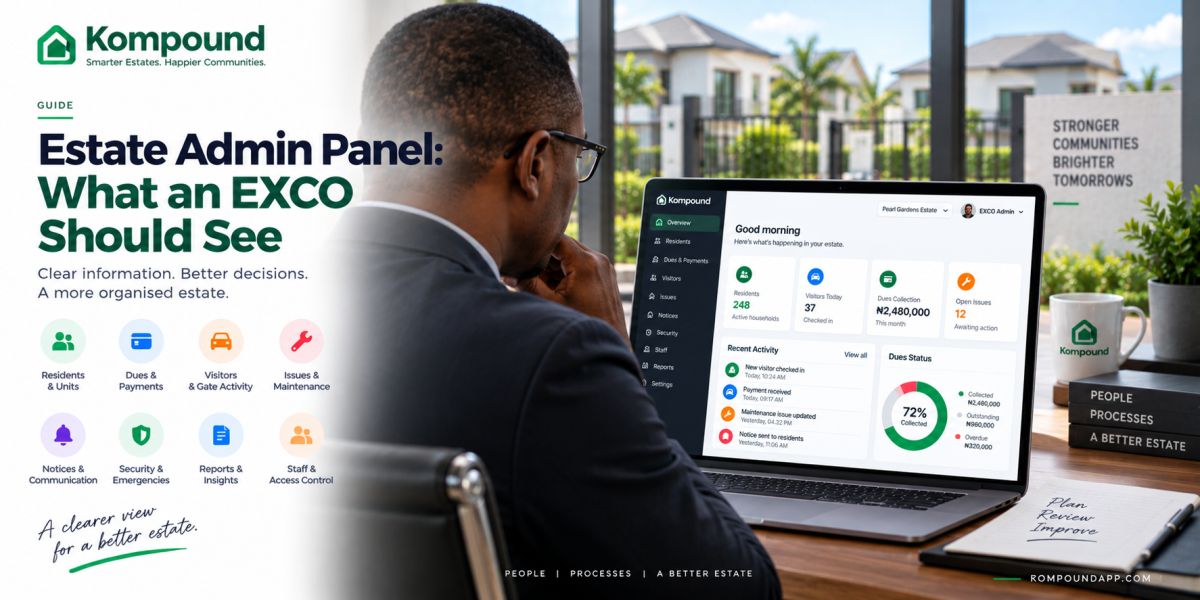
# Estate Admin Panel: What Your EXCO Should See
If you are on your estate EXCO, you should not need to call five people before you understand what is happening in the community.
You should be able to answer basic questions quickly.
Who lives in the estate?
Who owes dues?
What payments came in?
What issues are still open?
What happened at the gate?
Which notices were sent?
Are there unresolved security concerns?
Which members of staff are active?
That is what a good estate admin panel should give you: visibility.
Not more paperwork.
Not another complicated dashboard.
A clear view of the things you are responsible for.
What is an estate admin panel?
An estate admin panel is the management side of your estate software.
Residents may use an app.
Your gatemen may use a gate interface.
Your EXCO, estate manager or facility manager needs a different view.
The admin panel should bring together the information you need to run the estate, including areas such as:
- Residents and properties
- Estate dues
- Payments
- Visitor activity
- Security
- Issues and maintenance
- Notices
- Staff
- Emergency incidents
- Reports
- Administrative permissions
The goal is simple:
You should know what is happening without having to chase people for information.
Your dashboard should answer questions, not just show numbers
A dashboard with twenty colourful charts can still be useless.
Every number should help you understand or act on something.
For example:
Instead of:
> 273 residents
you may also need to know:
- How many properties are occupied?
- How many residents were recently added?
- Which records are incomplete?
- Which residents have moved out?
Instead of:
> ₦8.4 million collected
you may need:
- What was billed?
- What was actually collected?
- What remains outstanding?
- Which properties are in arrears?
- Which payments need review?
Good estate software moves you from numbers to decisions.
1. You should see your residents and properties clearly
Your resident register is one of the foundations of estate management.
You should be able to identify:
- Houses or units
- Owners
- Tenants
- Current occupants
- Registered household members
- Relevant contact information
- Registered vehicles
- Occupancy status
- Account status
You should also be able to update records when people move in or out.
That sounds simple.
But when your resident information is split between spreadsheets, WhatsApp contacts and different EXCO members, even simple questions become difficult.
Your admin panel should give you one organised source of truth.
2. You should know who owes the estate
You should not need to wait for the treasurer to open a spreadsheet before you know the estate's collection position.
Your admin panel should help you see:
- Charges raised
- Amount collected
- Outstanding balances
- Residents in arrears
- Part payments
- Exemptions where applicable
- Different dues or levies
- Payment history
You may not need every EXCO member to see every financial detail.
But authorised administrators should be able to understand the estate's position.
A good system should make it easier to answer:
> “How much should we have collected, and how much have we actually collected?”
3. You should be able to review payments
Residents will occasionally say:
> “I have already paid.”
Your management team should have a better process than:
> “Please send the screenshot again.”
Your admin panel should make it easier to identify:
- Resident
- Property
- Charge
- Amount
- Payment date
- Transaction reference
- Remaining balance
Where something needs investigation, it should be clear that the payment requires review.
The objective is not to eliminate every payment problem.
It is to make those problems easier to trace.
4. You should see your defaulters separately
If you have 500 residents and 70 owe money, you should not have to search through all 500 accounts manually.
Your admin panel should help you identify overdue accounts quickly.
That gives you a clearer basis for:
- Payment reminders
- Instalment discussions
- Arrears reporting
- Financial planning
Be careful not to turn a software label into your entire enforcement policy.
Your estate constitution, agreements and applicable rules still determine how you handle arrears.
The software should give you accurate information.
Your EXCO decides what to do with it.
5. You should see what is happening at the gate
Your gate is not separate from estate management.
Your administration team should have an appropriate way to review gate activity when necessary.
That may include:
- Visitor entries
- Visitor exits
- Resident who approved the visitor
- Access credential used
- Date and time
- Security officer involved
- Relevant access alerts
You do not need your EXCO sitting at the gate watching every visitor.
You need the ability to review the record when something requires attention.
That is the difference between monitoring everything and having accountability when needed.
6. You should see unresolved estate issues
If residents are reporting problems through your system, management should be able to see what still needs action.
For example:
- Broken streetlight
- Water leak
- Drainage problem
- Faulty gate
- Generator issue
- Waste collection complaint
- Security concern
Your admin panel should help you distinguish between:
New
Assigned
In progress
Resolved
That stops maintenance from becoming a memory test.
If fifteen people report problems this month, you should know which fourteen were resolved and which one is still waiting.
7. You should know what residents have been told
Communication creates fewer disputes when you can show what was actually communicated.
Your admin panel should keep a record of important estate notices.
That can include:
- AGM announcements
- Payment reminders
- Security alerts
- Water interruptions
- Maintenance notices
- New rules
- Community events
- Emergency messages
If an important notice was sent two months ago, you should not have to search somebody's WhatsApp history to find it.
8. You should see emergency alerts clearly
If your residents have access to an SOS function, your management and security workflow needs to support it properly.
Your system should make it possible to determine:
- Who raised the alert
- When it was raised
- Relevant location
- Whether security received it
- Current status
- Whether the incident has been resolved
An emergency alert should not simply disappear because someone dismissed a notification.
Where appropriate, you need a record.
9. You should have staff accountability
Your estate may employ or work with:
- Gatemen
- Security supervisors
- Cleaners
- Caretakers
- Facility staff
- Administrators
Your administrative system should help you understand who has access to what.
For example:
- Which gatemen are active?
- Which administrators have accounts?
- Who performed an important action?
- Has a former staff member's access been removed?
- Which security officer processed a particular visitor?
This matters when people change roles.
Your former gateman should not still have access three months after leaving.
Your former EXCO administrator should not continue using an old management account.
10. You should have an activity history
Sometimes the most important question is:
> “Who changed this?”
Maybe a resident balance changed.
Maybe an administrator edited something.
Maybe a visitor record was handled unusually.
Maybe an account was removed.
An activity log can help you understand who performed important administrative actions and when.
You do not need to watch the log every morning.
You need it when something does not make sense.
11. You should control administrative permissions
Not everyone on your EXCO needs full system access.
Your chairman may need one level of visibility.
Your treasurer may need financial access.
Your estate manager may need operational access.
Your security supervisor may need gate-related information.
Your secretary may need communication tools.
Good estate software should help you separate responsibilities.
Avoid the temptation to give everybody:
Username: admin
Password: estate123
Shared credentials remove accountability.
Give people the access their role requires.
Remove it when the role ends.
12. You should be able to run useful reports
Your reports should help you manage the estate, not create more work.
Useful reporting may include:
- Resident numbers
- Dues raised
- Dues collected
- Outstanding balances
- Payment history
- Visitor activity
- Open issues
- Resolved issues
- Security activity
- Other operational records
Your monthly EXCO meeting becomes easier when you already have the information.
Instead of spending the meeting asking:
> “Does anybody know the figure?”
you can spend it deciding what to do next.
Read next: Estate Reports Your EXCO Should Run Monthly.
13. Your admin panel should make handover easier
Your EXCO will eventually change.
That should not mean starting from zero.
A new management team should be able to inherit organised records instead of receiving:
- Three Excel files
- Two notebooks
- A USB drive
- An old phone
- Hundreds of WhatsApp messages
- Several passwords nobody understands
Your estate platform should preserve continuity.
The people running the estate can change.
The estate's records should remain.
Read next: Estate Software Data Ownership and Export.
14. Your admin panel should not expose everything to everyone
More access is not automatically better.
Your system may contain:
- Resident information
- Payment records
- Visitor history
- Phone numbers
- Security information
- Emergency records
Your estate should decide who genuinely needs access.
This is both a security issue and a privacy issue.
A committee member who only handles social events probably does not need access to residents' financial records.
Use the principle:
The right information for the right role.
What your admin panel should not become
There is another side to this.
Your management dashboard should not become a place where you spend your entire day micromanaging residents and staff.
You should not need to:
- Watch every visitor live
- Read every resident interaction
- Manually confirm every normal payment
- Approve every minor estate action
- Constantly check every screen
Good software should reduce management work.
It should bring exceptions to your attention and keep normal operations organised in the background.
How often should you check the admin panel?
Different information needs different attention.
You may want to review some things frequently:
- Important security incidents
- Emergency alerts
- Critical maintenance problems
Other information may be reviewed weekly:
- Outstanding issues
- Payment changes
- New resident records
Financial and operational reports may be reviewed monthly.
Your admin panel should support your management rhythm.
It should not create a new addiction to dashboards.
Common mistakes to avoid
Giving every EXCO member full access
Use roles and permissions.
Depending on one administrator
More than one authorised person should understand how the system works.
Failing to remove old accounts
Review access whenever your EXCO or staff changes.
Having information but no process
Knowing there are 25 unresolved complaints means little if nobody is responsible for handling them.
Collecting reports nobody reads
Create the reports your team actually uses.
Replacing Excel without cleaning your data
If your current records are inaccurate, moving them into software will not make them accurate.
Clean them during migration.
Treating the dashboard as the estate
Your admin panel supports estate management.
It does not replace leadership, communication or good judgement.
How Kompound gives your management team visibility
Kompound brings your estate's administrative workflows into one management environment.
Depending on your estate setup, your authorised team can work across areas such as:
- Residents and units
- Delinquent accounts
- Estate dues
- Payments
- Visitor and gate activity
- Issues
- Emergency information
- Notices
- Support
- Staff
- Gatemen
- Administrative activity
At the same time, residents and gatemen use interfaces designed for their own jobs.
That separation is important.
Your resident should not see your admin tools.
Your gateman should not see your complete financial records.
Your EXCO gets the management view it needs.
The result should be a clearer picture of your estate without forcing one person to manually combine information from different systems.
See what your EXCO would actually manage
If your estate currently depends on spreadsheets, WhatsApp, payment screenshots and separate gate records, you can see how those workflows look inside Kompound before changing anything.
We can walk your chairman, treasurer, facility manager or estate administrator through the actual management view.
You can see how resident records, dues, payments, visitors, issues, notices and gate operations connect—and decide whether it makes your estate easier to run.
Frequently asked questions
What is an estate admin panel?
An estate admin panel is the management interface of an estate management platform.
It gives authorised estate administrators access to operational information such as residents, dues, payments, issues, visitor activity and communication.
Should every EXCO member have admin access?
Not necessarily.
Give each person access based on their responsibilities.
Your treasurer may need different permissions from your security committee or secretary.
Can your admin panel show residents who owe dues?
A good estate management system should help authorised administrators identify outstanding balances and account status without manually searching every resident record.
Can your EXCO review visitor activity?
Where visitor management is part of the platform, authorised management users should be able to review relevant access records when necessary.
Should gatemen use the same admin panel?
Usually not.
Your gateman needs a simpler security-focused interface.
Read: Estate Management App for Gatemen.
Can your admin panel help with EXCO handover?
Yes.
One of the major benefits of centralised estate records is that the information can remain available even when the people managing the estate change.
Can one admin panel manage multiple estates?
Some platforms support multi-estate management.
This is particularly useful for facility-management companies, developers or organisations managing several residential communities.
Read next: Multi Estate Management on One Platform.
Should your estate still use Excel?
You may still use spreadsheets for specialist analysis.
But your essential resident, payment, visitor and operational records should not depend on one person's private spreadsheet if a shared management system can maintain them more reliably.
The simple test
Your estate admin panel should let you answer:
Who lives here?
Who owes us?
What has been paid?
What is still broken?
What happened at the gate?
What have residents been told?
Who is responsible for what happens next?
If you can answer those questions without calling three people and opening five different files, your management system is doing its job.