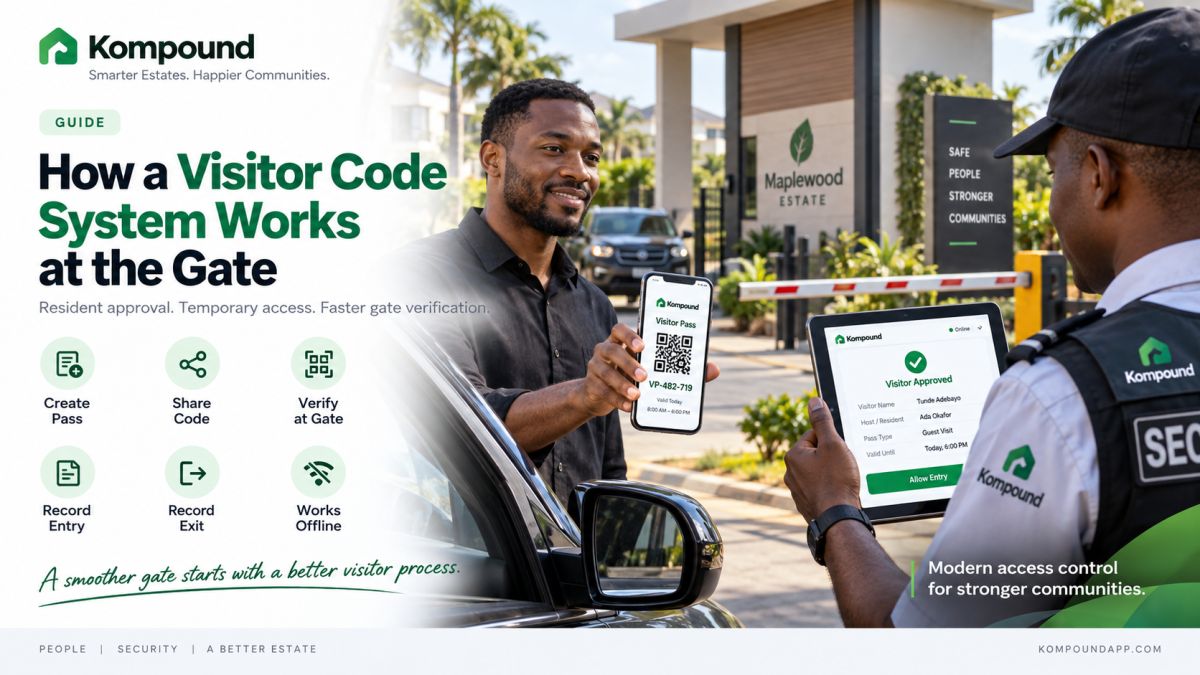
A visitor code system removes one of the most frustrating parts of estate security:
your gateman having to call you every time someone comes to see you.
Instead, you approve the visitor before they arrive.
Your visitor receives a temporary code.
Security verifies the code at the gate.
The visitor enters.
The estate keeps a record.
That is the basic idea.
But for the system to actually improve security, the code needs to be temporary, connected to a real resident, easy for your security team to verify and properly recorded when it is used.
Here is how the full process should work.
What is a visitor code?
A visitor code is a temporary access credential you create for someone coming to your estate.
Instead of telling your gateman:
> “My visitor is coming. His name is Emeka.”
you create a pass connected to the visit.
Your visitor then presents the code when they arrive.
Security verifies it before allowing access.
The code connects four important things:
Visitor → Resident → Approval → Gate entry
That makes the process more reliable than asking a guard to decide whether someone sounds genuine.
How the process works
A well-designed visitor code system should be simple.
Step 1: You expect a visitor
You know someone is coming to see you.
Instead of waiting for them to reach the gate, you approve them beforehand.
Step 2: You create a visitor pass
You enter the information your estate requires.
That may include:
- Visitor name
- Date of visit
- Expected arrival period
- Access duration
- Vehicle details where necessary
The system generates a temporary code.
Step 3: You send the code to your visitor
You can share the code before they leave for your estate.
The visitor does not necessarily need to download the estate app.
They simply need the credential your estate accepts.
Step 4: Your visitor arrives
At the gate, the visitor gives the code to security.
Your gateman enters or scans the credential.
Step 5: Security verifies it
The gate system checks whether the pass is valid.
Your security officer should receive a clear result.
For example:
Approved
Expired
Invalid
Already used
Security can also see the resident connected to the visitor where appropriate.
Step 6: Entry is recorded
Once the visitor has been verified, security records the entry.
Now your estate has more than someone's name in a notebook.
You have a record connected to the person who authorised the visit.
Step 7: Exit is recorded
When the visitor leaves, security records the exit.
That gives your estate a more complete access history.
The full process becomes:
You approve → visitor receives code → gate verifies → entry is recorded → visitor leaves → exit is recorded.
Why this is better than calling you at the gate
Think about what happens with the traditional process.
Your visitor arrives.
Security asks:
> “Who are you visiting?”
The visitor gives your name.
Your gateman calls you.
You do not answer.
They call again.
You are in a meeting.
Cars are waiting behind your visitor.
Eventually you answer and say:
> “Yes, let him in.”
That process works.
But it does not scale well.
If your estate has hundreds of homes and dozens of daily visitors, security spends a significant amount of time making phone calls.
Pre-approval moves the decision before the visitor arrives.
Your gateman is no longer trying to obtain permission.
They are verifying permission you already gave.
The code should be temporary
This is extremely important.
A visitor code should not become a permanent password for entering your estate.
If your visitor comes on Saturday, the credential should normally be tied to that visit.
Different visitors may need different access periods.
One-time visitor
The code may work for one visit only.
Weekend guest
The pass may remain valid for a defined period.
Cleaner
You may need recurring authorised access.
Contractor
The credential may remain active for specific working days.
Event guest
The pass may only work during the event period.
The rule is straightforward:
The access should last only as long as the reason for access lasts.
What should your gateman see?
Your security officer should not need your entire resident database just to verify somebody.
They need enough information to make the access decision.
That may include:
- Visitor name
- Host
- Pass status
- Validity period
- Entry status
- Relevant vehicle information
- Any approved access warning
The result should be obvious.
A guard should not need to interpret technical error messages while cars are waiting.
What happens if someone guesses a code?
Visitor codes should not be designed like:
> 1234
or:
> 0000
The system should generate credentials that are difficult to guess and validate them against an actual approved visit.
A random person entering numbers at the gate should not gain access simply because they eventually find a valid format.
Security should also confirm the visitor information displayed by the system rather than treating possession of any number as automatic proof of identity.
The code is part of the verification process.
It should not be the entire security process.
What happens when a code expires?
The gate should reject it.
If your visitor genuinely still needs access, you can create or extend the appropriate approval according to your estate's rules.
Your gateman should not need to improvise.
This is one of the advantages of digital access control.
The system can tell security:
Valid
or:
No longer valid
instead of asking them to remember when someone was supposed to visit.
What happens if your visitor loses the code?
You can resend it or create another pass depending on how your estate system works.
If you cancel the original credential, it should no longer provide access.
You should not have to call the entire security team and tell everyone:
> “Please ignore the first code I sent.”
The access system should handle that centrally.
Can visitors share their codes?
Technically, any credential sent to another person can potentially be shared.
That is why the gate should not rely blindly on the code alone.
The pass should connect to information about the expected visit.
Security can verify that the person presenting the credential reasonably matches the approved visitor information.
For higher-security environments, your estate may add:
- QR verification
- Visitor photo
- Vehicle registration
- ID checks where appropriate
- Additional guard confirmation
How far you go should depend on your actual security needs.
Should every visitor use the same type of pass?
Not necessarily.
Your mother visiting for Sunday lunch and an electrical contractor working for five days are not the same type of visitor.
Your estate may need different access rules for:
- Family and friends
- Dispatch riders
- Domestic workers
- Contractors
- Artisans
- Event guests
- Drivers
- Regular service providers
The important thing is that every category has a defined procedure.
What about delivery riders?
Deliveries are one of the biggest reasons a visitor system needs to remain fast.
You probably do not want your gate blocked because every food-delivery rider requires a long registration process.
Your estate should decide:
- Whether riders can enter
- Whether you must approve them
- Whether you collect orders at the gate
- How late-night deliveries work
- Whether riders can move beyond specific areas
Then configure your access process around that policy.
The software should support your estate rules.
It should not invent them.
What about unexpected visitors?
Visitor codes work best when you know someone is coming.
But people will still arrive unexpectedly.
Your estate needs a fallback procedure.
For example:
- Visitor identifies you as the host.
- Security requests your approval.
- You approve or reject the visitor.
- The approval is recorded.
- Security admits the visitor only after confirmation.
The important part is that unexpected access should still create an identifiable approval.
> “He said he knows somebody here.”
is not enough.
What happens when the internet goes down?
This is one of the first questions you should ask before choosing a visitor-code system for a Nigerian estate.
Imagine your visitor already has a valid pass.
They arrive at 7:30 p.m.
The network is down.
Can your gateman still verify them?
If every verification requires a live connection to a remote server, your entire digital gate process may stop working.
Where possible, an estate gate system should be able to retain already-authorised visitor information locally so security can continue checking valid passes during temporary connectivity problems.
When the connection returns, records created during the interruption can synchronise.
Whatever system you choose, ask the vendor:
> “Turn off the internet and show me what still works.”
That demonstration is more valuable than simply being told the software has “offline capability.”
What happens if the power goes out?
Your code may still be perfectly valid while the gate equipment has no power.
Your estate should therefore think about:
- Gate phone battery
- Tablet battery
- Router backup
- Access terminals
- Boom barrier backup
- Controller power
- Manual gate operation
Visitor management is a process.
The app is only one part of it.
Can visitor codes open a boom barrier?
Yes, where your access-control system and barrier hardware are compatible.
The process might work like this:
Visitor credential verified → access approved → controller receives command → boom barrier opens.
But you do not need a boom barrier to use visitor codes.
Your gateman can verify the code and manually open your existing gate.
That allows you to digitise your visitor process before investing in additional hardware.
Visitor codes vs a handwritten visitor book
A visitor book tells you what someone wrote.
A visitor-code system can tell you who actually authorised the visit.
That is a major difference.
With a handwritten book, you may see:
> Chinedu — House 24 — 3:15 p.m.
But you may not know:
- Whether House 24 expected Chinedu
- Who approved him
- Whether he left
- Whether the information was accurate
- Which guard processed the entry
A properly configured visitor-code system can create a stronger relationship between the host, visitor and access event.
Read next: The Estate Visitor Book Is Failing You.
What visitor codes do not solve
Visitor codes are useful.
They are not magic.
They do not replace:
- Trained security guards
- Good lighting
- CCTV where appropriate
- Perimeter security
- Clear gate procedures
- Emergency response
- Proper access rules
A visitor can have a valid code and still behave suspiciously.
Your security team still needs judgement.
Technology should give them better information.
Common mistakes to avoid
Using permanent visitor codes
Temporary visitors should normally have temporary access.
Giving everyone the same estate PIN
Once that PIN spreads, your estate no longer knows who is entering.
Making codes difficult to verify
Your gateman should be able to check a credential quickly.
Ignoring expiry
Old visitor passes should not remain active indefinitely.
Forgetting exit records
Entry without exit gives you an incomplete access history.
Depending completely on the internet
Know your offline procedure.
Not training your gatemen
Your guards should understand exactly what different results mean.
Allowing security to bypass the process casually
> “I know him.”
should not automatically override your access rules.
How Kompound handles visitor codes
With Kompound, you can create a visitor pass before your guest reaches the estate.
The visitor receives a temporary access credential that can be presented at the gate.
Your security team can then use the Kompound gate interface to verify the visitor and connect the visit to the resident who approved it.
The gate workflow is designed around a simple process:
Resident approval → visitor credential → gate verification → entry record → exit record.
Kompound can also form part of a wider access setup involving compatible QR readers, gate terminals and boom barriers where your estate needs additional automation.
Most importantly, your gate process does not have to depend entirely on repeated phone calls between residents and security.
See the visitor-code process yourself
If your estate currently depends on:
> “Call the resident and ask if the visitor can enter,”
you can see what the alternative looks like before changing anything.
We can demonstrate the complete Kompound visitor journey using the same type of situation your estate handles every day.
You will see:
how your resident creates a pass, how the visitor receives it, what your gateman sees, how entry is recorded and what happens when connectivity becomes unreliable.
Bring your estate manager or security supervisor.
Let them test it too.
Frequently asked questions
What is a visitor code for an estate?
A visitor code is a temporary access credential created for someone who has been authorised to enter a residential estate.
How does a visitor code work?
You approve the visitor before arrival, the system generates a temporary credential, and security verifies it at the gate before granting access.
Does your visitor need the estate app?
Not necessarily.
A visitor code can usually be shared directly with the visitor, depending on how your estate's system is configured.
Can someone reuse a visitor code?
That depends on the pass rules.
One-time visitor credentials should stop working after use or expiry, while recurring access may remain active for an approved period.
Can a visitor code expire?
Yes.
Temporary credentials should have an appropriate expiry period rather than remaining active indefinitely.
What happens if the visitor arrives after the code expires?
Security should reject the expired credential. You can then provide a new approval where appropriate.
Can your visitor code system work without internet?
That depends on the platform.
For Nigerian estates, you should specifically ask whether already-approved credentials can still be verified during a temporary network outage.
Can visitor codes work with a boom barrier?
Yes, where your software, access controller and boom barrier are compatible.
Are visitor codes safer than a visitor book?
They can provide stronger access control because the credential can be connected directly to a resident's approval and an access record rather than relying only on information written down by the visitor.
Can you use visitor codes without automating your gate?
Yes.
Your security officer can verify the visitor digitally and then open your existing gate manually.
The simple rule
Your visitor code system should make one thing very clear:
this person was invited, this resident approved them, this credential is valid and this is when they entered.
If your gateman can establish that in seconds, you have made your gate both easier to use and easier to account for.